Unroll.Me - Inbox Mail Cleaner
- 4.5
- Rating
- 1.00M
- Installs
- Free
- Price

 Analysis by App-foxy
I tried Unroll.Me as a way to deal with the kind of inbox that becomes tiring before it becomes genuinely useful. The appeal is easy to understand: instead of opening every promotional message one by one, you get a focused tool for finding unwanted subscriptions, stopping them, and reducing the clutter that makes important email harder to notice. It is a free productivity app from Unroll.Me, aimed at Android users who want a cleaner inbox without spending an afternoon sorting messages manually.
My first impression was that this is not really an email replacement. It works better as a cleanup layer around the inbox you already use. That distinction matters. You still need your normal email service for conversations, receipts, work messages, and personal correspondence, while this app is most useful when the problem is recurring marketing mail and the mental effort of managing it.
The app has an Everyone content rating and runs on Android 8.0 or later. Its current version is 3.3.27, and its popularity is reassuring: it has passed one million installs, with an average rating of 4.5 from around eighty-eight thousand ratings. Those figures do not guarantee that it will suit every inbox, but they do suggest that the basic idea is clear enough for a large number of people to use successfully.
You May Also Like

 Blood Strike: 2.5 Anniversary
Blood Strike’s Loadouts Turn Every Drop Into a Tactical Gamble
A close look at Blood Strike’s custom loadouts: how fast access to signature weapons reshapes its battle royale rhythm, rewards preparation, and narrows the gap between fights.

 Pandora - Music & Podcasts
Pandora’s Music Is Easy to Start, but Harder to Recover
Pandora’s strength is its low-effort path from a seed to a station. Its weak spot is how much confidence it asks you to place in connection, setup, and quiet recovery.

 8 Ball Pool
 Is Built on Rivalries, Rematches, and Routine
A close look at the rivalries, rematches, shared routines, and unanswered safety questions that turn a quick pool match into a persistent mobile community.

 Samsung Music
’s Quiet Strength Is Playing What You Already Own
Its reach comes less from spectacle than from dependable access to a personal library. That simplicity is both the app’s strongest retention engine and its ceiling.

 AccuWeather: Weather Radar
AccuWeather Review: A Quick, Clear Forecast for Everyday Decisions
For everyday plans, the best forecast is the one you can understand quickly. AccuWeather makes rain timing, radar, and local conditions easy to act on, with a few trade-offs.

 Hill Climb Racing
Why Hill Climb Racing Still Turns Crashes Into One More Run
A tiny car, a bumpy hill and one more upgrade: Hill Climb Racing keeps resurfacing because its simple chaos makes every near-miss feel personal.
More From Our News Desk



What to expect before you begin
The most useful way to think about this app is as a subscription-management assistant, not a universal solution for every kind of spam. If your inbox is full of newsletters, store announcements, travel offers, mailing lists, and old services you no longer remember joining, it has a sensible job to do. If most of your unwanted mail comes from random senders, scams, or messages that never behave like ordinary subscriptions, you may still need your email provider’s spam controls.
That difference is one of the first things I would explain to a friend. The app can make recurring commercial email easier to identify and handle, but it should not replace caution. I would not use it as a reason to open suspicious messages, and I would not assume that every unwanted email belongs in the same category. A genuine newsletter, a transaction notice, and a fraudulent message may all look like clutter at first glance, but they require different responses.
The experience is most rewarding when you approach it with a small goal. Rather than expecting a completely empty inbox, aim to remove the subscriptions you already know you do not want. That makes the first session feel practical instead of overwhelming. Once the obvious items are dealt with, you can decide whether the remaining messages are useful, occasional, or simply not worth the space they take.
The strongest benefit is not just fewer messages; it is fewer repeated decisions. Every recurring email asks you to ignore it, delete it, archive it, or read it. Removing the source of that decision can be more valuable than clearing a single page of messages. This is where the app feels different from manually deleting email, because deletion treats the symptom while subscription cleanup can address the recurring stream.
How I would prepare for the first session
Before opening the app, I would decide which email account needs attention most. If you have several accounts, starting with the one used for shopping, registrations, or newsletters usually produces a more noticeable result than starting with a quiet personal account. That is not because the app is limited to one type of inbox, but because the benefit is easier to see when recurring promotional mail is the main source of noise.
I would also avoid beginning immediately before an important workday or while waiting for a time-sensitive message. Inbox cleanup is usually low risk when handled carefully, but any tool that helps manage email deserves a moment of attention. The sensible habit is to review what you are acting on, especially when a sender could occasionally deliver something useful.
Getting from installation to a cleaner inbox
I’d treat the first cleanup as a short, careful pass rather than a mission to empty the inbox: choosing one familiar, clearly unwanted subscription gives you a concrete result and a chance to check that the change was right. Once that feels comfortable, you can decide whether the remaining senders are worth reviewing or whether your regular email app is the better place to handle them.
First setup: keep the process deliberate
After installation, the first meaningful step is connecting the email account you want to organize. I found it helpful to treat this as a review step rather than tapping through it automatically. Read the account and access prompts, choose the intended inbox, and make sure you are not beginning with an address that contains work or family messages you cannot afford to mishandle.
The app’s purpose becomes clearer once it has enough inbox context to identify recurring senders. This is also the point where expectations should stay realistic. It is not magic sorting that understands every message perfectly. Sender names and message patterns can be useful clues, but your judgement still matters when deciding whether a mailing list is genuinely disposable.
A good first setup routine is to keep your main email application available in the background, then use it as a reference when a sender seems unfamiliar. If a message is linked to an account, order, appointment, or service you still use, I would pause before removing anything. This two-screen approach takes a little longer, but it reduces the chance of treating a useful notification as a nuisance.
For privacy-conscious users, the important question is whether they are comfortable allowing a cleanup service to work with their inbox. That is a personal decision, and the right choice depends on the account involved and your own tolerance for third-party access. Someone with a private, low-stakes promotional account may find the convenience worthwhile, while someone handling confidential professional correspondence may prefer to use built-in email tools instead.
The first successful action should be small
When the app presents subscription-related messages, I recommend starting with one sender you recognize and no longer want. That is a better first action than selecting a large group immediately. It lets you understand the result, check what changes in your inbox, and build confidence before doing more.
For example, imagine that you signed up for several clothing and electronics newsletters while comparing products, then stopped shopping from those stores. You may still receive their offers every week. Instead of deleting the latest messages one at a time, use the cleanup view to identify the recurring senders, choose one clearly unnecessary subscription, and complete that action. The meaningful success is not merely seeing one less email today; it is knowing that the same type of message should no longer keep demanding attention.
I would then return to the inbox and verify the outcome. This simple check is one of the most useful habits with any email-cleaning tool. It confirms that you acted on the intended sender and gives you a chance to notice whether the messages were part of a broader account relationship. If the sender also delivers receipts or account alerts, you may decide that stopping everything is not worth it.
Once the first action feels right, continue in batches based on confidence. Remove obvious promotional subscriptions first, leave anything connected to banking, healthcare, travel, school, or active accounts for a separate review, and stop when your attention starts to fade. The app can make cleanup faster, but speed is not the same as accuracy.
Where the app saves more effort than ordinary deletion
Manual deletion is fine for a few messages, but it becomes repetitive when the same sender returns every day or week. Searching for a sender, selecting old messages, deleting them, and repeating the process can consume more time than expected. This app is more useful when the problem is persistent rather than occasional.
It also changes the order of work. Instead of starting with the newest email and moving backward, you can think in terms of sources. That is a more strategic approach: identify who is producing the clutter, decide whether that relationship still matters, and then deal with the source rather than endlessly processing its output.
Another practical advantage is psychological. A large inbox can make people avoid email altogether, even when important messages are mixed in with harmless promotions. Reducing the number of recurring senders can make the inbox feel more manageable without requiring a complete archive project. For a first-time user, that narrower goal is much less intimidating than trying to reach zero unread messages.
Common confusion: unsubscribing is not the same as blocking
The wording around email cleanup can be easy to misunderstand. Stopping a subscription and blocking unwanted mail are related ideas, but they are not identical. Unsubscribing is generally aimed at ending a mailing-list relationship. Blocking is more about preventing messages from a sender from reaching the place where you normally see them. I would not assume that one action automatically solves every future message from that sender.
This matters when dealing with suspicious mail. A legitimate newsletter may offer a normal way to stop receiving it, while a suspicious message may be better handled through the email provider’s spam and phishing controls. I would avoid treating the app as a security scanner or using it to interact with messages that look deceptive. Its value is strongest with recognizable, recurring subscriptions.
Another possible misunderstanding is expecting the app to clean every type of inbox clutter. Receipts, delivery updates, appointment reminders, account notices, and personal conversations are not ordinary subscriptions just because they arrive repeatedly. Removing them could make your inbox quieter while also making it less useful. The best workflow is selective: use the app for unwanted recurring promotions and keep essential service messages under your normal email rules.
What to do when a sender is unclear
Unfamiliar sender names deserve a pause. I would open the corresponding conversation in my usual email app, inspect the context, and ask whether I still use the service. A company name may be different from the brand you remember, and a newsletter may be connected to an account you still need. If you cannot identify the sender, leaving it alone temporarily is safer than acting just to make the list shorter.
This is also where the app’s convenience has a trade-off. Grouping or presenting senders can make decisions quicker, but quick decisions can become careless decisions. The more crowded your inbox is, the more valuable a staged cleanup becomes. Do one pass for obvious marketing, a second for borderline cases, and stop before fatigue turns the process into random tapping.
Advanced habits that make the cleanup last
The first cleanup is only the beginning. If you want the result to hold, change the way you sign up for future offers. When a website asks for an email address just to reveal a discount, consider whether the discount is worth adding another recurring sender. The app can help you recover from accumulated subscriptions, but it cannot prevent every new one.
I also recommend keeping a short mental distinction between “useful occasionally” and “useful every week.” Some newsletters are worth receiving but do not need to arrive constantly. If the app helps you identify those senders, you can decide whether to keep them, handle them through your email provider, or remove them and visit the source manually when you actually want an update.
A less obvious trade-off is that a clean inbox can reduce discoverability. Promotional email is often annoying, but it can also contain a sale, renewal reminder, or event notice you would have found useful. I would not remove every commercial sender automatically. The better question is whether the sender provides value that you would miss, not simply whether its messages are promotional.
For people managing multiple identities, I would keep the cleanup order separate. Start with a personal shopping inbox, then review a secondary address, and only later consider an account used for work or important services. This prevents the desire for a tidy inbox from spreading into areas where the cost of a mistaken action is higher.
Who will appreciate it most
This productivity app is a good match for someone whose inbox has grown through years of online shopping, app registrations, contests, newsletters, and one-time purchases. It is especially helpful if you regularly delete the same kinds of messages but never get around to stopping them at the source.
It can also suit a first-time cleaner who feels overwhelmed by email rules. Traditional inbox tools often ask you to build filters, labels, folders, or search queries. Those tools are powerful, but they require a certain amount of setup knowledge. Unroll.Me offers a more direct starting point for the narrower problem of recurring subscriptions.
I would be more cautious about recommending it to someone whose primary concern is advanced organization. If you need detailed folder structures, complex rules, team workflows, or precise retention practices, your existing email provider may be the better center of operations. This app is focused, and that focus is both its strength and its boundary.
It may also be a poor fit for users who do not want a separate service involved in inbox management. In that case, the slower route of using the unsubscribe controls and spam reporting tools already built into your email app may feel more appropriate. It takes more manual effort, but it keeps the process inside tools you already trust.
How it compares with ordinary email tools
Most email apps already let you delete messages, search by sender, report spam, and sometimes unsubscribe from mailing lists. Those options are enough for light cleanup. Their advantage is familiarity and direct control. You do not need to learn another interface, and you can handle each message in the same place where you read it.
Unroll.Me becomes more compelling when the volume of recurring subscriptions makes those individual controls tedious. Its value is in bringing the subscription problem forward as the main task instead of leaving you to discover it message by message. That makes it less of a replacement for Gmail, Outlook, or another mail client and more of a specialist tool used alongside them.
There is no reason to choose only one approach. I would use this app for the first pass through a crowded promotional inbox, then rely on the regular email app for spam reports, important account messages, personal communication, and detailed organization. That division of labor is more realistic than expecting one cleaner to handle every email decision.
The practical limits I noticed
The biggest limitation is the need for human review. A tool that makes subscriptions easier to manage can still present choices that require context. If you move too quickly, you may remove something you occasionally need. The app reduces repetitive work, but it does not remove the responsibility of understanding what each sender represents.
Another limitation is that cleanup is not a one-time cure for poor inbox habits. New subscriptions arrive whenever you register for a service or accept a marketing option. Without changing those habits, the inbox can gradually become noisy again. I see the app as a reset button and maintenance aid, not a permanent substitute for sensible email choices.
Finally, users looking for a complete spam-defense system should keep their expectations in check. The app’s strongest use case is unwanted subscription mail. Security threats, fraudulent messages, and aggressive senders still call for the protections and reporting features of your email provider. Knowing that boundary makes the app safer and more useful.
My recommendation for a first session
I would install it when the inbox problem is specific: too many recurring promotional messages, too many newsletters, or too much time spent deleting the same sender repeatedly. I would connect the least sensitive inbox that has the most obvious clutter, choose one recognizable subscription as the first test, and verify the result in the normal email app.
After that, I would continue only with senders I can identify confidently. Keep receipts, account alerts, and important service notifications out of the first pass. When the obvious cleanup is finished, decide whether the remaining messages are worth managing here or whether your email provider’s filters and folders are a better fit.
For me, the app succeeds because it turns an amorphous inbox problem into a manageable source-by-source task. It is free, accessible to Android users on version 8.0 or newer, and simple enough for someone who does not want to learn a complicated email system. Its 4.5 average and broad adoption reflect a useful everyday idea, but the best results still come from careful choices.
My final view is that Unroll.Me is worth trying when recurring subscriptions, rather than genuine spam or complex organization, are the reason your inbox feels exhausting. I would recommend it to a friend who keeps deleting the same newsletters and promotional messages without ever stopping them. I would skip it for confidential accounts, advanced business workflows, or anyone who prefers to keep all email management inside an existing provider. Used selectively, it can deliver a clear first win without demanding that you rebuild your entire digital life around it.
FAQs for Unroll.Me - Inbox Mail Cleaner
01What is Unroll.Me, and how does it work?
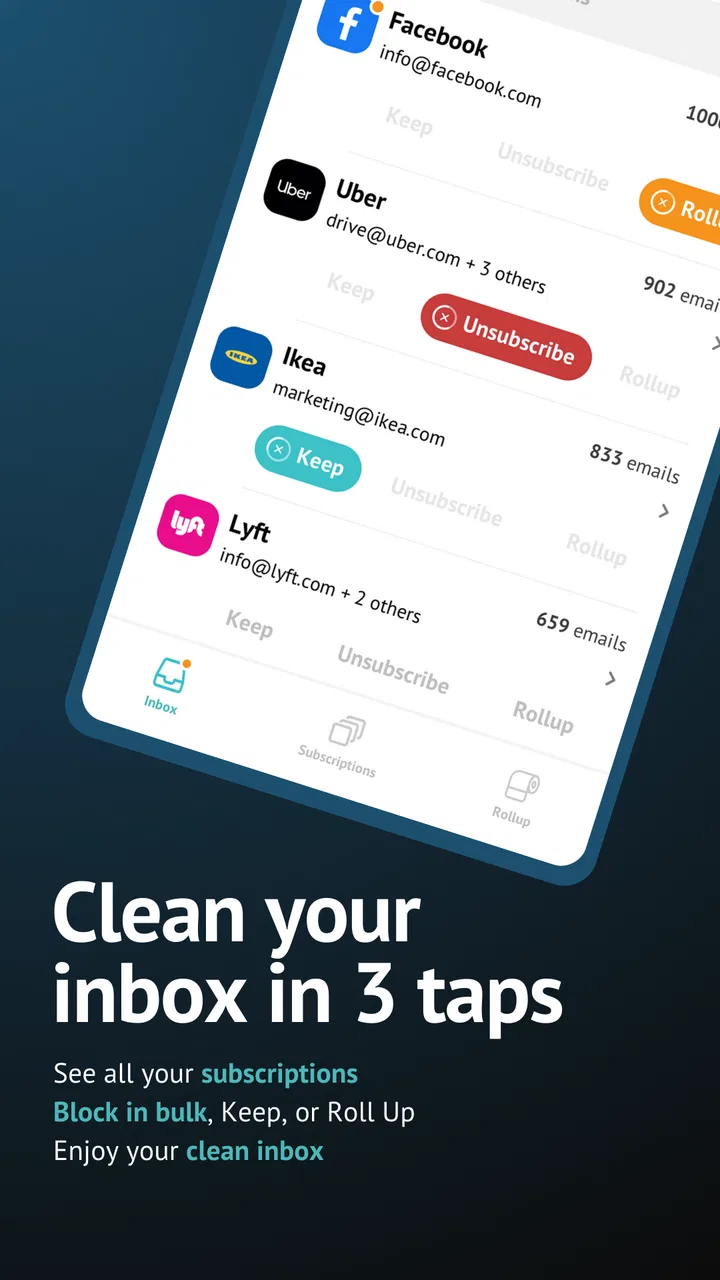
Unroll.Me is an email management tool that helps users manage their inbox clutter by allowing them to unsubscribe from unwanted emails, consolidate subscriptions, and organize their inbox efficiently. Once you connect your email account, Unroll.Me scans your inbox for subscriptions and lets you decide which ones to keep, unsubscribe from, or add to a daily Rollup digest.
02Is Unroll.Me safe to use with my email account?
Yes, Unroll.Me is designed with user privacy and security in mind. The app uses encryption to protect your data and adheres to strict privacy policies. However, it's important to be aware that Unroll.Me collects data from your email account to provide its services, so reviewing their privacy policy can offer additional assurance.
03Can I use Unroll.Me with any email service provider?
Unroll.Me supports a variety of major email service providers, including Gmail, Yahoo Mail, Outlook, and AOL. It may not work with smaller or less common email services, so it's advisable to check compatibility with your specific provider before downloading the app.
04Does Unroll.Me offer a mobile app, or is it only available on desktop?
Unroll.Me offers both a mobile app and a web-based version, making it accessible for users who prefer managing their emails on the go or from a desktop. The mobile app is available for both Android and iOS, providing flexibility and convenience irrespective of your device preference.
05Are there any costs associated with using Unroll.Me?
Unroll.Me is primarily a free service, allowing you to unsubscribe and manage your emails without any cost. However, they may offer premium features or services for a fee. It's always a good idea to check for any updates regarding pricing or premium offerings within the app or on their official website.
Pros
- Simplifies inbox management easily.
- Quick setup with intuitive interface.
- Supports multiple email accounts.
- Helps unsubscribe from unwanted emails.
- Free to use with no hidden costs.
Cons
- Limited features in the free version.
- Occasional glitches when syncing.
- Privacy concerns with data access.
- Not all emails can be unsubscribed.
- Ads in the app can be distracting.

Unroll.Me - Inbox Mail Cleaner
Gallery